RostamVPN Mobile Security
English
AzərbaycanDeutschEnglishEspañolFrançaisHrvatskiIndonesiaItalianoKiswahiliNederlandsNorskO'zbekPortuguêsSuomiTiếng ViệtTürkmençeTürkçeΕλληνικάБеларускаяКыргызчаРусскийТоҷикӣУкраїнськаҚазақшаעבריתالعربيةتۆرکجهفارسیکوردیहिन्दीไทยབོད་སྐདမြန်မာትግርኛአማርኛខ្មែរ中文한국어

RostamVPN is now Rostam Mobile Security

Mobile security that shows its work.

Your phone reaches hundreds of places you never chose. Protect Mode checks each one and refuses the hosts known for malware, phishing and the remote control of infected devices — then tells you which, and why. The encrypted tunnel is how that protection reaches you.

No account, no email, nothing to fill in. Free to start.

Refused today4
  • cdn-update.secure-login.top Allow Phishing · Marlow Hosting LLC · AS64497 · Netherlands
  • files.dl-free-apk.icu Allow Malware · Kelvin Datalink Ltd · AS64501 · Singapore
  • sync.node-telemetry.live Allow Controls infected devices · Orval Networks BV · AS64505 · Germany
  • stat.rare-endpoint.xyz Allow Rare destination, unusual port · Tamar Carrier SA · AS64509 · Brazil

Example notices, in the shape the app shows them. On your phone the list is your own traffic.
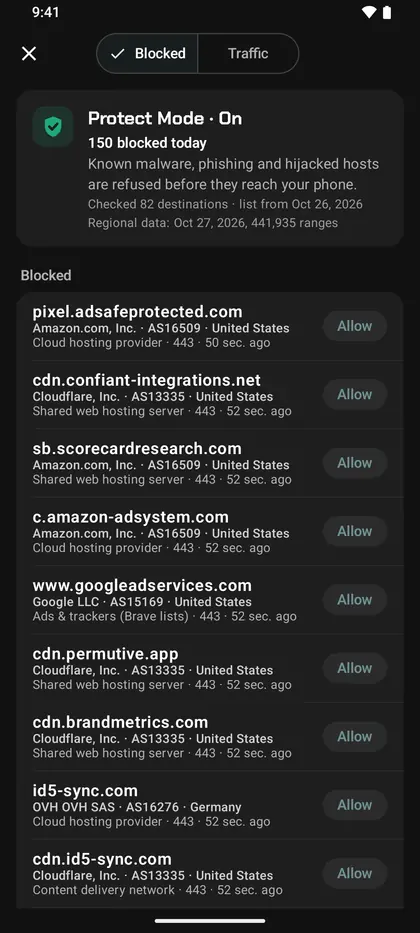
The Protect Mode screen, listing each destination it refused with the reason, the organisation behind the address, its AS number and its country.

Protect Mode

It checks where your phone is going, and refuses the places it should not go.

Protect Mode is the part of RostamVPN that does the security work. Every destination your phone opens is checked against a threat list built from a licensed commercial threat-intelligence feed and our own analysis, and the hosts known for malware, phishing and command-and-control are refused.

Every block, with the reason

Not a silent counter. Each refusal is listed with what it was: malware, a phishing page, or a host that controls infected devices.

Who the host belongs to

Each row names the organisation behind the address, its AS number and the country it sits in, so you can judge it yourself instead of taking a verdict on trust.

One tap to allow

A block you disagree with takes one tap to undo. Anything you allow stays allowed, and the list is yours to edit at any time.

You can turn it off

Protect Mode is a switch, not a condition of using the app. Off means nothing is checked and nothing is sent.

The check itself runs on our service, not on your phone: the app sends the destination and asks. The block is what happens on the phone.

The connection

The tunnel is how the protection reaches you.

RostamVPN still does what it always did. The encrypted connection carries your traffic, and it carries Protect Mode's checks with it, so the protection travels with your phone rather than with whichever network you happen to be standing in.

Wi-Fi you did not choose

Hotel, airport and cafe networks are shared with strangers and run by people you will never meet. Inside the tunnel, what you send is theirs to carry and not to read.

Built for networks that filter

Where connections are blocked on sight, the app tries one way out after another and keeps the first that gets through. If that one stops working, it finds another by itself.

One tap, nothing to configure

No list of locations to study and no protocol to pick. Open it, tap once, and it works that out for you.

What it costs

Three days unlocked. Then you pay.

Install the app and everything is open for three days: full speed, every location, nothing held back. No account, no card, nothing to sign up for.

When the three days are up the app stops and asks you to subscribe. It does not keep running slowly in the background. We would rather you read that here than discover it at the worst possible moment.

In Iran, Russia, Cuba and Syria the app costs nothing at all, paid for by donors and by subscribers elsewhere. There is no three-day limit, no payment screen, and no card to decline. That is a decision, not a trial.

Get it

Install it on your phone.

Android and iPhone. The Android file is served from this site itself, so it still works where an app store does not. Open it and your phone asks once for permission to install; after that the app updates itself.

Protect Mode comes with the app. Turn it on, and the first notices appear the same day.

What we do not do.

The whole data flow, in plain words: Privacy.